2026 Best LC Patch Panel for Global Buyers?
Choosing the 2026 best lc patch panel requires more than comparing port counts or catalog prices. Global buyers need verified performance, stable supply, and installation evidence.
Industry data supports this demand. Dell’Oro Group’s data center research continues to track strong investment in cloud infrastructure and high-speed connectivity. MarketsandMarkets also forecasts sustained growth in the global fiber optics market. These trends increase pressure on passive components, including LC patch panels, to support denser racks and faster upgrades.
Small details matter.
A reliable lc patch panel should provide accurate adapter alignment, clear labeling, secure cable management, and documented insertion-loss performance. Buyers should also check connector compatibility, fiber type, rack-unit dimensions, operating temperature, and test reports based on recognized standards. IEC and ISO references can improve technical confidence, but they do not replace product-level verification.
Jim Hayes, president of the Fiber Optic Association, has repeatedly emphasized, “Fiber optics is not plug-and-play.” That warning remains practical in 2026. A poorly cleaned LC connector can create visible attenuation, even inside a well-designed rack. The best panel is therefore not always the cheapest or most densely populated model.
It must fit the installation reality.
This guide compares leading options for data centers, telecommunications rooms, enterprise networks, and international projects. It considers field experience, manufacturer transparency, warranty support, and documented testing. Some rankings may remain debatable, because regional availability and installer skill can change the outcome. That limitation deserves attention before any global purchase decision.
What Is an LC Patch Panel and How Does It Work?
What Is an LC Patch Panel and How Does It Work?
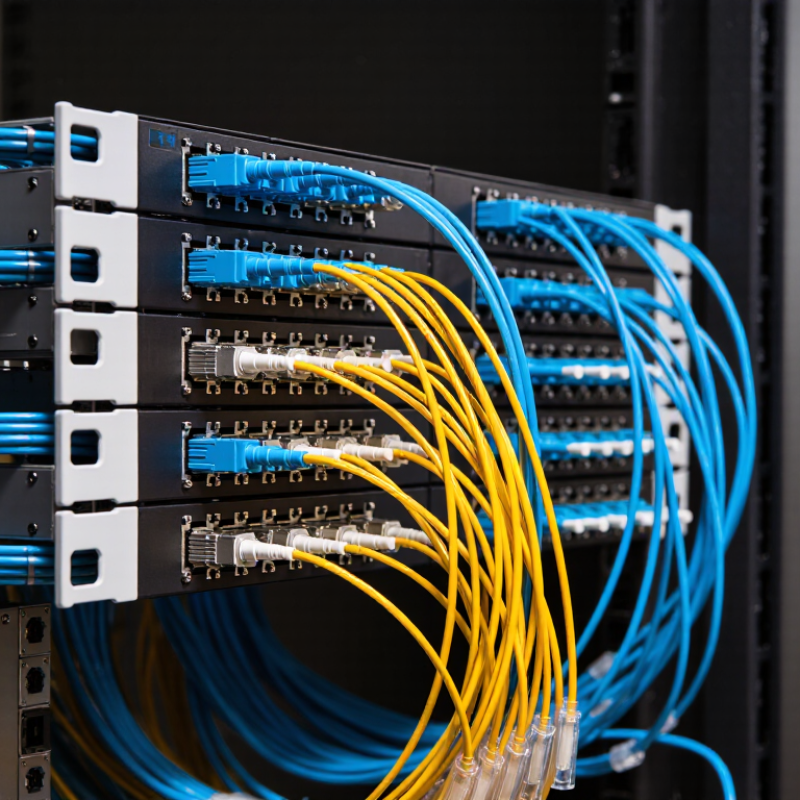
An LC patch panel is a fiber-management unit that organizes LC connectors inside a rack or wall cabinet. It provides a stable connection point between incoming fiber cables and active equipment, such as switches or optical transceivers. LC connectors are small, push-pull fittings with ceramic ferrules. Their compact size supports high-density installations.
Inside the panel, fibers are routed through adapters, splice trays, and cable guides. An installer connects outside plant fiber to the rear side, then uses short patch cords on the front. This arrangement makes testing, replacement, and circuit changes safer and faster. It also protects delicate fibers from sharp bends and accidental pulling. In practice, neat routing matters more than appearance. Poor slack control can create hidden signal loss. I have seen tidy panels fail because bend limits were ignored.
Tips: Check connector type, fiber mode, adapter alignment, and rack depth before ordering. Confirm the panel supports the required port count and cable entry direction. Keep a simple labeling record. It saves time during faults. Use cleaning tools before every connection, even when the connector looks clean. Dust is easy to underestimate. For global projects, verify local installation rules, temperature ratings, and documentation requirements. A universal design is useful, but it may not fit every cabinet or network plan. When selecting a panel for 2026 projects, prioritize service access, clear labeling, secure strain relief, and proven compatibility over a crowded feature list.
2026 Best LC Patch Panel for Global Buyers?
What Is an LC Patch Panel and How Does It Work?
An LC patch panel is a rack-mounted fiber management unit that terminates, protects, and organizes LC fiber connections. It provides fixed adapter ports between incoming backbone cables and outgoing patch cords, making testing, maintenance, and network changes easier.
The chart shows the fiber capacity created by common LC duplex adapter counts. Each LC duplex adapter carries two fibers, so the fiber capacity is calculated as adapter count × 2. Actual capacity depends on the panel design, rack unit height, splice trays, and cable-management space.
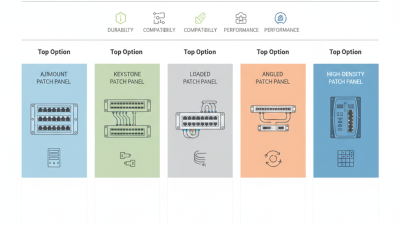
Which LC Patch Panel Types Will Suit Different Network Designs in 2026?
Choosing the best LC patch panel in 2026 depends on the network design, not just port density. Rack-mounted panels suit data centers with organized cabinets, while wall-mounted units work better in compact telecom rooms. For fast service changes, modular panels allow adapters and cassettes to be replaced without disturbing nearby fibers.
High-density LC panels save rack space in large server rooms. Sliding versions improve access during testing and cleaning. Splice-integrated panels suit links that combine backbone cable with short equipment connections. For enterprise networks, a 24-port duplex panel often balances capacity, labeling, and maintenance. Larger sites may need 48-port designs, but crowded trays can increase bend-radius risks.
Fiber type also matters. Single-mode panels support long-distance campus and carrier links, while multimode panels fit shorter data-center connections. Angled adapter layouts can reduce cable congestion near switch ports. Field inspections often reveal loose labels and overfilled cable managers.
Small details matter. A technically correct panel may still be difficult to maintain. I would also question buying maximum density too early; future expansion, technician access, and cleaning space deserve equal attention.
How to Compare Fiber Count, Adapter Density, and Installation Features
2026 Best LC Patch Panel for Global Buyers?
Choosing an LC patch panel starts with fiber count, not appearance.
Confirm whether the specification means fibers, ports, or adapter positions. An LC duplex adapter serves two fibers, so a 24-port panel commonly manages 48 fibers. This distinction prevents costly ordering mistakes. Small details matter.
Adapter density affects both rack space and maintenance.
A high-density panel can save a rack unit, but crowded adapters may restrict finger access. Check the panel’s port spacing, labeling area, and bend-radius control. A practical design should guide cables smoothly, without sharp pressure near the rear tray. Leave room for future connections when the budget allows.
Installation features often decide whether a panel performs well after deployment.
Look for sliding trays, removable adapter plates, secure cable clamps, and clear polarity markings. Tool-less mounting can reduce installation time, while a splice-ready compartment helps protect fusion joints. Verify rack compatibility, connector cleanliness, and regional documentation before purchase.
I once treated easy mounting as the main advantage, then lost time correcting poor cable routing. That experience changed my comparison method. A panel that installs quickly but complicates testing is not genuinely efficient. Inspectors should also confirm labeling durability and access for power-meter testing. Truthfully, no panel fits every site; dense cabinets and small network rooms require different compromises.
How to Evaluate Quality, Cost, Suppliers, and Long-Term Maintenance?
2026 Best LC Patch Panel for Global Buyers?
How to Evaluate Quality, Cost, Suppliers, and Long-Term Maintenance?
A reliable LC patch panel should protect fiber performance inside a busy rack. Check insertion loss, return loss, adapter alignment, and bend-radius control. For high-density installations, inspect the tray movement and connector spacing. A sharp bend can create hidden signal loss. Dust caps should fit tightly. Materials should resist heat, vibration, and repeated access. Request test reports for each production batch, not only a general certificate.
Price comparisons must include the landed cost. Freight, duties, spare adapters, labeling, and replacement labor can change the final figure. Ask suppliers for a sample unit before placing a large order. Measure fit in your cabinet and test several connectors repeatedly. A supplier with traceable quality records, stable lead times, and clear technical replies is usually safer. Very low pricing still attracts buyers. Sometimes, it reflects reduced inspection.
Long-term maintenance deserves equal attention. Choose panels with removable adapters, visible port labels, and enough space for cleaning tools. Confirm the availability of compatible parts for several years. Keep a small stock of couplers, dust caps, and mounting hardware. Maintenance teams should record cleaning dates and damaged ports. Standards such as IEC and TIA can guide testing, but paperwork alone does not prove field reliability. A minor weakness remains: supplier claims may sound precise while real installation conditions vary. Test before trusting.